

Showing posts with label updates. Show all posts
Showing posts with label updates. Show all posts
30 July 2026
Updating older animations: 25 Years Later (2020) south end room

13 July 2026
Updating older animations: 25 Years Later (2020) more progress.

I have made more progress on this improved version. I am keeping several shots from the older version; they look good, and recreating them to look the same is a waste of time and effort. The indoor lighting, I think, shows a huge improvement in the characters from the original, and I can get much more emotion on the faces.


16 June 2026
Iphone 17 pro and Ipad 13" pro M5

No to say having a phone doesn't have its positive points. I cycle long distances, sometimes to the states and having one is a safety feature. Also when I ride the bus I can call people ahead of time so they know how late I am (DAYS late the last time!) The camera is OK and will serve when I don't want to carry my real camera, a Nikon mirrorless Z 5II, around with me. I still don't like it. I hate having to have it with me when I am out so I can listen to podcasts, especially on long rides. I don't like the interface. I really don't like how dependent the world is on them... people walking aimlessly around looking into the palm of their hand for hours. Luckily I am not getting many calls these days so it isn't distracting me for a mice walk with the dog or anything like that. I'll get used to using it but I doubt I'll ever want to have it. It has a 33-hour battery life, which will last on the long bus rides to Boston and back.
On the other hand I replaced my 11" iPad pro and an older 13" iPad Pro (my brother gave it to me after he lost if for months, bought a new one and then found it and I love it! The screen is amazing, I didn't think it would make a difference but it does and it's powerful enough for whenever Blender comes to the iPad. I am waiting for Canvas to release their iPad version of their photo, vector and layout suite so I can do all my work mobile in one place. I bought a multi-purpose cover. One is a normal cover that can act as a mouse pad and if I want, there is a keyboard cover that can sit on top of that. I also got the updated Apple Pencil to draw with as that is what I plan to most along with adit photos once the Affinity app is available. I plan on taking some trips to take photos, hopefully to the east coast and other places, using the iPad in place of a laptop.
I recycled my old laptop and a variety of other old, not really being used devices and now have these and the new Mac Studio as I slowly start my retirement.

19 March 2026
Animation:: 25 Years Later UPDATE - bike riding

Moving along with this project. I took the bike model and made it work for animation, meaning the wheels turn, the handlebars turn and the pedals turn and the whole thing can be moved as one object. Then I put the main character on it and, after a couple days of work, managed to attach his feet to the pedals so if they move his legs move and look like he is pedalling the bike. I cheated on the wheels and pedals turning in a way. There is a technique for making them turn when the bike moves forward but it involved math so I just couldn't handle it. Instead, I animated them by hand for 10 seconds, long enough for any scene this will be in and can drop it in and it will look fine. There are no close-ups of him on the bike, just medium long and long shots.
14 March 2026
Updating older animations: 25 Years Later (2020)

Original: 25 Years Later (2020) 4 minutes 19 seconds
The story of a man taking a bike journey from Montreal to Boston, where 25 years earlier, he had taken care of a sick friend and the memories invoked along the way. Made in Cinema 4D.
New version.... about the same length of time I'm thinking. More or less. I cut a couple shots while making my shot list for this new version but I think some of the other shots will get lengthened as I try and improve on them. This will be made in Blender. The characters a re made the same as the first version but since switching to Blender I have a much better handle on how to make them more realistic. I am going to have much more cinematic lighting, I hope, and more atmosphere to each shot plus better movement and emotions on the two characters.
Above is the cyclist character in all the versions I will need throughout the film. The second character changes more dramatically and will be more of a challenge.
A big challenge will be remaking all the sets. There was A LOT and I don't plan on cutting any out. Interiors and many exterior shots of cycling from Montreal to Boston. As this is a deeply personal film for me, I want it to be special, though I doubt even as many people who saw the first version will watch this updated one.
12 February 2026
Behemoth media website update 2026
This was a long time coming. I added new art, graphic design, videos and updated information. I still need to make a new demo reel but I don't have time for the 2D animations I want to make to go in it.
I recently put all my documentaries on You Tube in restored and slightly improved versions for free. Please check them out. I have started remaking some older animations to replace a few I can do much better with now. I am sort of "shoring up my legacy" (such as it is) as I am about to semi-retire, I hope, and would like my stuff to up to date and show itself off in the best light.

01 November 2025
Review: Affinity 3.0 Now Affinity Studio Canva

Over a year ago, Affinity sold to Canva, which is maybe Adobe’s closest competitor, giving it a suite of professional design materials. Over the last year, development with Affinity has been slow, or so we thought. In reality the company was fixing bugs in the 2.5 versions while preparing this new 3.o version. Of course, the forums and social media were filled with dread and negative speculation. When Affinity went from version 1 to 2, the same thing happened. Much of the panic and doom was from obvious trolls, probably Adobe fans or even employees not happy that another company was making headway in the graphic design software world. The posts were absolutely certain it was going to be a subscription service or become a browser-based app or triple in price.
This time the marketing strategy was even worse, or was it? They took the current products off sale and closed the forums. Not nice but maybe it was for the best. They started a Discord that not too many people joined over the month wait and was filled immediately with the same paranoia and trolling. Not as many current users were exposed to it though and after a couple weeks it calmed down and people were fighting age-old "Mac/Windows" crap. In a way this, I think, lessened the exposure current users had to the panic and trolls and while no one was happy to wait a month with no forum to rely on for help, I don’t think 4 weeks waiting was a deal breaker for many of them.
The release.
Affinity Studio is free, for all time, it seems and Canva is using it to bring people from Adobe to their subscription service by keeping the suite self contained and fulled featured except for AI functions. AI is something the majority of Affinity Photo users want no part of so they don’t have to now. If they do, they can join the Canva subscription service that already existed to get them. The download you need a Canva account, the same as Serif used for Affinity to verify the software is legit when you sign in. You cannot be connected to the internet for as along as years and when you are connected again, it just checks. The software will work in the intervening time. This has not been the case with Adobe. This all seems expected and it’s fair enough.
The new software.
It’s sort of a stretch to say it’s new as it is mostly the same as 2.6 in features, with a couple new ones added. The interface had change and that will take getting used to. I don’t like the grayscale icons after being spoiled with easy to find coloured ones for years. The three Affinity programs are merged into one. Some people have commented that this is a problem and not professional despite the fact it has been an option since Affinity Publisher was released. When Affinity started, you could always open and edit any Affinity file in any of the other apps. It’s had to imagine something more useful and professional than that! Things are categorized differently or just in different places but most are still there.
The only missing feature I have noticed so far is the Book feature is gone or so hidden I can’t find it. It’s something I desperately wanted Serif to add for years and they finally did. It allows you to make a file that can include multiple external files. Chapters or magazine sections, for example, then rearrange them and have the numbering update automatically and also make a table of contents that updates automatically if you change something. I have used it for books and thought it would be great for setting up a magazine. Magazines are usually set up in sections with different people working on articles, pages of ads, etc. and this gives a lot of flexibility and also lets you export it all as one file for the printer. It never worked 100% or even 80% for some reason and was frustrating but it just needed to be improved. Maybe it will come back and work well in a future update.
New features.
While they mention EPUB, something affinity never touched, in the update documents is a future addition. EDIT: I just discovered that you can export to EPUB from the export window. There are acouple options and I will try that in the near future.
Canva has added bitmap vectorization, something users have been champing at the bit for since version 1. I find lit lacking, as I do most factorization software. Adobe Illustrator had a really great vectorization feature until the I think the cloud thing started. It had lots of adjustments and you could fine-tune it before committing. It then got rid of the fine-tuning and this version in Affinity is sadly closer to that than the older Illustrator model. If the image is very simple and has only or mostly solid colours, it will work great. If there is too much variation or detail, it fails. I will be keeping with Super Vectorizer Pro for the foreseeable future.

Here is a best-case scenario test with an old logo design of mine and it looks good.
Top is the oringinal.
A new addition I was not expecting, it might be in Illustrator already is gradient fill using a mesh. This is going to be very useful! Instead of using masks and multiple layers of gradients and still not being able to follow the contours of your object, this lets you shape the fill as you please and add colours to any mesh point. It should make realistic or complicated vector drawings much easier to work on.

Conclusion.
I don’t see a reason to complain about all the awful things predicted that never happened and say well, they might happen at some point. Free is not something to sneeze at when the software does what it always did and more with more to come. I don’t like the interface; I will get used to it and have already finished a project for a client and am working on another. The studio is noticeably faster on my Intel Mac and only crashed when I tried to use the AI driven help chat. Not a surprise and I am not a fan of AI chat anyway.
Sorry to those expecting the worst but it’s a good start and a possible way to break the monopoly Adobe has had (and abused) on the graphics industry. I’d say buy it - but IT’S FREE!
13 November 2023
Website update for 2024

I was not happy with the last update I did for the behemoth website. mostly, I thought the menu setup just didn't work. I redesigned the logo and made the menu clearer and I hope more fun to look at. I added a large slideshow of work I have done and re-arranged the information on the other pages to make it easier to see as much as possible. My new animation was selected for several festivals so I wanted that information updated as well. I deleted the link for Instagram as I am off it officially now. There are some more animated sections of the site itself now. If anyone ever visits I hope they find it fun.
08 October 2022
Topaz Photo AI and DXO Photolab 6 (with DXO Viewpoint 4)

Topaz Labs which makes the apps I use for denoising, sharpening and enlarging photos released a new product which, a nice surprise, was considered included with the apps I already had so I got to download it for free. It's basically a more automatic and less powerful version of the other apps rolled into one.
I would say it's a great product, it's easy and does pretty much what you need for most photography issues that are not extreme in nature. You can quickly take away pixel noise, sharpen the image and enlarge it in one place instead of three apps. The other software isn 't useless, it's more powerful and when you have a very low light situation or and old photo that is too small to use or too blurry it can make them relevant again for print or other work. If you don't have the other products, this would be a good way to get the basic benefits of Topaz AI without spending a lot of money or taking up space on a laptop.

DXO Photolab is my "Lightroom" replacement or to be honest, my Adobe Bridge replacement since I never used Lightroom. It's limited compared to the Adobe products in how many formats it can handle... basically just JPG, RAW and Tif and I think this new version has some ability to open video but I haven't looked into that yet. Version 6 sees an update the denoise function which was already maybe the best out there. I also added the DXO Viewpoint add-on which integrates itself into the normal functions of Photolab and can be opened as a stand alone. The update price, in CAD, was 150$ and money not well spent.
It's not the the software hasn't improved or that Viewpoint is't great to have integrated directly into the workflow. The problem is the updates are mostly minor and Viewpoint is pretty much identical to the NIK plugin that does the same thing, in the same way but only as a standalone app. I should have know better since the last couple of NIK updates were not worth the price either.
If you don't have any of the DXO/NIK products I highly recommend them but the updates, while arriving often, are not anything to pay more for. The NIK plug-ins are just updated to the new interface, a fantastic interface, but you are paying for a full upgrade for only a couple of them and then again a year later for a couple more. That should have been done in one paid update to be worthwhile.
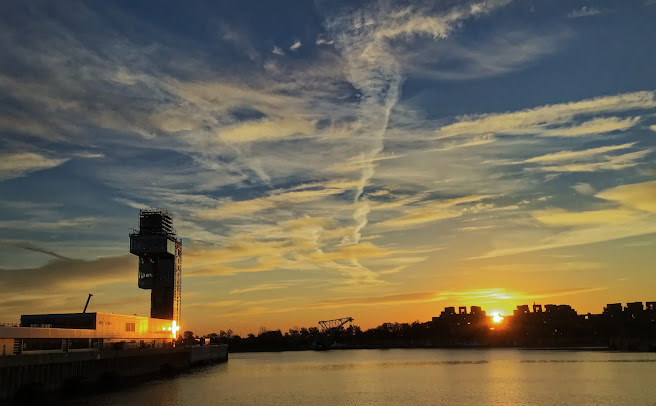
IN USE all this stuff is great.The photo above was taken on my morning ride on my far from great iPod touch phone. I was able to improve it to the point it could have been taken with my DSLR, something ithtthat I do not always have with me on rides.
03 February 2022
Site Update: Behemoth media

I updated my portfolio/main website recently. There are new products, web animations and some rearranging of the materials there for 2022. There is a still much to do. The site has to be more friendly and organized towards potential clients I might get from online job search sites. A big might since I never seen get a peep from jobs I apply to from those sites as a rule. I have to get my act together and out together more motion graphics video in my demo reel as well. animated shorts have been a passion and they include motion graphic work but I need to show I can and have done more generalized work in that area.
11 July 2021
August updates? Affinity, Procreate and Krita
While no official dates are announced, it seems a few software companies have some updates happening most likely in August.
Affinity Suite:

Krita:

Procreate:

Blender:

Blender is close to a 3.O release and the new Cycles render engine loose amazing and makes me feel the need to switch much more acutely as I don't think I'll be updating my computer anytime soon and really could use a boost in render speed!
05 June 2021
NIK 4 Plugin suite by DXO

Silver Efex Pro and Viveza got a major interface overall and a couple new features along with better U-Point control which is the primary reason to get these plugins - in my opinion. I really like the new look. It's modern, easy to read and better organized. Viveza has needed some love for a long time and it is finally where it need to be. Silver Efex pro got the addition of Clearview, borrowed from DXO Photolab which clears out haze and can really add drama to a dull photo. I already have that in DXO Photolab thought and adding more presets which was a large % of the update to me is cheating when listing new features.
To make this worth the upgrade price, they really need to apply the new interface to all the plugins and maybe they will before NIK 5 is released. If not I won't be updating again as while the new look is great, they all work fine as it is and they would have to add really amazing new and unthought of functionality to make me spend more money. They update DXO Photolab quite a bit between paid iterations and I hope NIK will get some of that attention too.
That said, if you don't have the NIK collection at all, it is well worth having and does amazing things. It integrates more completely with Photoshop and Lightroom but it works nicely with Affinity with the exception of Perspective Efex which you have to run as a stand alone. HDR Efex is my favourite HDR processor but to use it with more than one photo, which is what HDR is really all about, you have to either do the initial processing in Affinity and then open HDR Efex or open is as a standalone to import a series of bracketed pictures at once which is what I would recommend.

08 February 2021
recent updates: Affinity Photo, Designer, Publisher and Krita and Sparkle Web Designer

There have been a nice amount of updates recently. Some things update more than others and I would say free software like Krita and Blender are pretty fast and furious with updates while some commercial software seems to be slowing down. Maybe it is the pandemic. Free software people might have more time as their normal jobs are on hold while commercial software might be the opposite because it's those companies who might have put jobs on hold. This is just a quick take on my latest updates and not an in-depth review of any of the software.
The Affinity Suite
I won't lie, I was really hoping for an iPad version of Publisher to get released as it was sort of scheduled for last year. That aside the 3 desktop and iPad apps got nice improvements and Serif as a company seems to really listening to its users.
Photo has a great new blend mode, Divide that is wonderful for taking a colour tint from photos. I tried it with a night shot from Budapest which had a very strong yellow tint because of the lighting and it was impressive as you can see.


Designer has a nice contour tool that is hard to describe as it have a few uses that really give you more options for designing and vector drawings.
Publisher had PDF passthrough now which makes adding them to existing documents super easy. There were problems still with adding them. I have a project which uses a 300 page PDF and it works like a charm... at first. Reopening the file was a nightmare and I had to split the PDF up into sections and export each section as jpg pages. Smaller Pdfs were better but slow to open. It's edging closer and closer to having all the features I want form Indesign so - progress. For the next big update, 2.0 which will be paid most likely, I would love to be able to group pages in the page window so you can drag them around higher or lower in the hierarchy. This would make book with chapters that get moved around much easier to accomplish. Right now there is some limit to how many pages you can select and move and it's not easy to drop them in the right place.
Krita
This has been moving along nicely and is more and more my choice for drawing on the computer. The blending brushes and the natural look to the painting, drawing etc brushes is really amazing. It's a little buggy now and then but this new update has been bug free for me so far. It needs better text handling if only for adding my name, title and date to a finished piece easier.
Sparkle Web Designer
This software is always fixing bugs and improving. This time is had a blog feature I would love to use as some point. If I continue to have almost no one reading this one it might be easier to just switch the blog to Sparkle and integrate with my home/portfolio page.
19 December 2016
Behemoth site update

I finally got the nerve to dump Dreamweaver and bought Sparkle, which I wrote about earlier this year. I don't do much internet design anymore so it's mostly just my own site and a couple others I maintain. I thought it would take weeks to months to get it right, like a Dreamweaver reboot would have but it honestly only took a day to work out most of it. After a few weeks I went back and changed a few things after thinking harder about some of the features.
Also, I added my dew doc, Village Gai, my new animation Cool Air and a couple of the science shorts I do for Dr. Christopher labor at Mouton No More. I updated my CVs too so its all up to date for 2017.
08 December 2016
Affinity Photo 1.5
As promised, Affinity has released a HUGE update to their photo app and it's pretty amazing over all. Already giving Photoshop a run for it's money, this version fills in many gaps and requests from users and really puts it level with and in some cases above Photoshop now in terms of usability and useful features.
Is it perfect? No at all. What it is is a robust, professional photo editing app that has most of what any pro might need. I really like the new stacking features and the focus stacking outshines Photoshop in my opinion easily. Where it needs work is the HDR persona. I am an avid user of the NIK?Google suite of plugins, especially HDR Pro and that is still king for my work in HDR. It's hard to even get similar looks for comparing the two with the same images. One feature all the NIK/Google plugins have is the pin selection tool which is put genius for selecting areas to affect changes to. I don't know why no one else has taken this approach because I would use it for just about everything. The pugs for the most work well in Affinity Photo, the improvement being part of this update so I was hoping i could import an HDR and then tone it using HDR Pro... didn't really work well. It looked fine in HDR Pro but didn't import back into Affinity photo. Maybe this is something that will be addressed in the next update (which come fairly often).
Right now the price is lower so I would say buy it if you don't have it already. Updates are free until they get to version 2.0 I think and with Adobe's monthly rip off scam and price, getting this now is a no brainer.
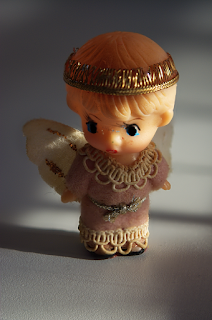
A 4 image focus merge taken with natural light:
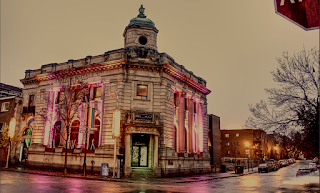
HDR with Affinity Photo:
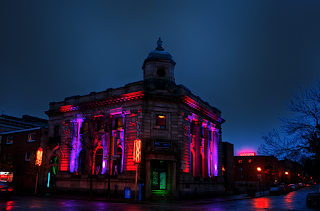
Similar shot, taken minutes apart with HDR Pro.
I really couldn't get them much closer. I had better luck using HDR pro in Affinity Photo with just one RAW file.
Is it perfect? No at all. What it is is a robust, professional photo editing app that has most of what any pro might need. I really like the new stacking features and the focus stacking outshines Photoshop in my opinion easily. Where it needs work is the HDR persona. I am an avid user of the NIK?Google suite of plugins, especially HDR Pro and that is still king for my work in HDR. It's hard to even get similar looks for comparing the two with the same images. One feature all the NIK/Google plugins have is the pin selection tool which is put genius for selecting areas to affect changes to. I don't know why no one else has taken this approach because I would use it for just about everything. The pugs for the most work well in Affinity Photo, the improvement being part of this update so I was hoping i could import an HDR and then tone it using HDR Pro... didn't really work well. It looked fine in HDR Pro but didn't import back into Affinity photo. Maybe this is something that will be addressed in the next update (which come fairly often).
Right now the price is lower so I would say buy it if you don't have it already. Updates are free until they get to version 2.0 I think and with Adobe's monthly rip off scam and price, getting this now is a no brainer.
A 4 image focus merge taken with natural light:

HDR with Affinity Photo:

Similar shot, taken minutes apart with HDR Pro.
I really couldn't get them much closer. I had better luck using HDR pro in Affinity Photo with just one RAW file.

15 November 2013
2014 updates

This page (as you may have noticed) is updated with a new look. The Portfolio has a similar update, is rearranged and added a new demo-reel and a page for stuff on sale. Should be less complicated to fond things and the video page is less overwhelming and all on one page instead of in a clickable html database.
11 July 2012
Behemothmedia.com has been updated
A brief note to ask everyone to check out some small updates to behemothmedia.com
There are new images, new publications, including a pdf version of my book on Copps Hill Burying Ground and better designed photography section.
There are new images, new publications, including a pdf version of my book on Copps Hill Burying Ground and better designed photography section.
30 June 2012
Choosing how to back up data

My choices at the moment are a couple of external disks with "live data", stuff I might need to access right away and a large number of DVD disks titled "portfolio 1, 2 etc" linked to a database (Filemaker) of info and images to help me search and find things. I've had this system for at least 10 years now and it's served me well enough but as files get bigger and storage space cheaper, it's time to re-think it all.
The advice I get is pretty all over the place. From, just keep doing like you have been, to get a tape system to have 3(!) copies of everything in various formats linked to a central server. Obviously, some people I know live in a world where they have tech support, money and other resources more readily available to them than I ever will. My needs are pretty modest overall, I just want an easily accessible way to save files and combine it with making more of my work, particularly photos, easier to access right away.
My first step will be to buy 2 internal terabyte drives to replace 2 smaller ones on my tower and then buy 2 additional external drives to match up with the internal ones. (I already have one big internal and external drive) My tower has 4 drives, one is a system drive for apps, fonts etc and that will stay exclusively for that. The other three will be one for video, one for work and one for play, essentially all my movies, music and personal stuff. I will then re-organize ALL my DVD back-ups on to the hard drives and make a copy on each external drive to match. The really hard time consuming thing will be to go through all that data and put it into a filemaker database. It took me 8 hours a day, 5 days a week for 3 months last time. I am also going to go through a step many people think of as unthinkable for some reason, dumping a lot of old work I've never looked at since it was done, including many photo shoots and getting rid of duplicate files. I know, "you never know you might need that one day", but you know... you can know in many cases and it's just pack ratting to keep every single thing you've ever done. If some client calls you out of the blue 20 years later for a copy of a project you are not obligated to have it waiting for them. If you can even open it still!
I could go the tape route, but that's an entirely new system and not practical for a small time designer like me, with hard drives I can plug them into a new computer or a laptop if need to to as well. The "cloud" is another option, but unlike a few friends who jump on everything new, I think the cloud is a very a bad idea and really impractical for video and other large files. I could never afford the bandwidth (we pay for usage here in Québec), not to mention my severe misgivings over privacy and having my data and life's work on some companies server. I have no desire to wait hours for a film project to download either just to get one clip for my demo reel.
As n most things, the most important thing to making a decision is not what's "best", there is no "best" way to do anything, just the best way for you to do something. In the case of back-up the number thing priority is just to do them!
10 June 2011
New Look
Always trying new things, including the image of Behemoth media. This is the most radical departure in a long time. The portfolio/home will have a few more changes as well. I am experimenting with some HTML 5 techniques that should be ready for use in a couple weeks to add a little more interactivity. No one went to the mobile version of the site so I will use the new techniques to make the "normal" site more accessible to mobile devices such as tablets.
I think the new look is a little more universal and will hopefully give potential clients the chance to imagine their project in place of the Behemoth items. Sort of like preparing your place for sale, you have to de-personalize a bit so the prospective buyers can see themselves in your place.
I think the new look is a little more universal and will hopefully give potential clients the chance to imagine their project in place of the Behemoth items. Sort of like preparing your place for sale, you have to de-personalize a bit so the prospective buyers can see themselves in your place.
28 January 2011
Huge site update!

Behemothmedia.com has had a major update. Mostly it's a simplification of the site, making it much more a portfolio page and less and information source of what's going on... that's what the blog is for! I also decided to host videos and photos off site as much as possible. I just saves time and resources and always for more flexibility.
I am sure it won't please everyone... it already hasn't in fact, but overall it's a step in the right direction I think. The point is to give potential clients a look at my work and that's what it does.
Not sure I'll keep that photo on the front page. I do believe that most people like to "see" who they might be hiring, but that photo I'm not so sure about.
Subscribe to:
Posts (Atom)