Showing posts with label critique. Show all posts

23 November 2023

Review: Procreate Dreams


 Procreate is the go to drawing/painting program for me and many others, its clean interface, fantastic price with lifelong free updates and ever expanding features has made it the choice of pros and hobbyists and puts them all on an even playing field. Its been around I think 15 years and while it started out a little wonky the makers have been attentive to users and determined to democratize art. When they announced a new product only a couple months ago, it was a mystery what is might be. Well, now we know and it appeared on my ipad when i woke up one morning this week and i was very excited to try it out.

The idea is to democratize animation in the same way Procreate did for art and drawing. Simple interface, professional quality output at an affordable price and again, lifetime free updates. It sort of succeeded. The performance is beyond anything else, it supports infinite undos and canvases up to 1 MILLION pixels, plays 4 K video in real time and your animations also play in real time with no need to render them first. They have stated some of these features will be making their way into Procreate soon. 

With all that amazing stuff being true, it is also true that this is a 1.0 app and it’s missing not only some basic features in other apps already out there like Toon Squid, which is even cheaper, but crucial drawing features already in Procreate. While Procreate has an uncluttered interface it suffers from hiding features by making them available with gestures you need to learn that are not always intuitive and sadly Dreams has inherited some of that. The thing that surprised me the most was the lack of drawing assistance tools like being able to draw perfect lines or shapes and the lack of some effects like a glow or bloom which Procreate has. It doesn’t export to animated gif like Toon Squid. 

This sounds like it is a disappointment, but it isn’t really for me overall. I expected and they were pretty upfront it was missing some important features before the release so bitching that they are not there when I knew they wouldn’t be seems dumb. The company has a very good, well earned reputation for quick updates and adding features the users want and buying it now insured me I was getting a nice price that i would never need to pay again and to begin learning at the ground level before new more complex features are added. I did the typical bouncing ball test to try it out and it took a couple tries and some you tube videos to make progress and figure out how I might use this. Was a bit frustrating but I see a lot of potential. 

Animation is complex, and no matter how easy someone tries to make it, it will always be complex. This allows some simplification and will introduce new features over time that will streamline things but Procreate Dreams is made to encourage hand drawn, traditional animation techniques over other types of animation which might help keep the human touch in what you create with it. 


18 March 2023

review: Vuescan (scanner driver application)


As I was about to scan 100s of photos and retouch them, I was faced with problem. My Epson 3200 scanner was not working well and really buggy. Researching the issues it turned out it was not compatible with Mac OS Ventura and Epson wasn't acting like it was about make another update to the scanner driver.  In my search I found a solution, an app called Vuescan by hamrick.com which backwards engineers scanner drivers and updates them for current OS features and gives them a new interface and in my case, some new functionality. 

To be fair, my scanner is something like 25 years old. It works really well, has some dust in it but that is about it for problems. It would also be extra fair to state that Epson's drivers are pretty terrible and feature light to say the least. the interface was bad and it didn't get better when it was controlled by Apple's interface in the Preview app. A lot of this is greatly improved upon in the Vuescan software... maybe a little too much improvement as it has so many features you can adjust it can take a while to get used to it. 

Pros:

It works! Better interface, new features to use and streamlined the process overall.

Cons:

Comes at a high price, 140$ CAD which is a lot for a driver. It works on many scanners from what I understand so it should last a long time and I am sure it costs a penny or two to write something like this. The interface is split into three choice, from beginner to advanced but it takes some time to figure it all out. There are bugs but they promise updates often and I have no reason to doubt that for now. 

It saved my from having to buy a new scanner that might not have worked any better than the old one and let me open files directly into Affinity photo which saved time. For me, worth it. 

08 October 2022

Topaz Photo AI and DXO Photolab 6 (with DXO Viewpoint 4)


 Topaz Labs which makes the apps I use for denoising, sharpening and enlarging photos released a new product which, a nice surprise, was considered included with the apps I already had so I got to download it for free. It's basically a more automatic and less powerful version of the other apps rolled into one. 

I would say it's a great product, it's easy and does pretty much what you need for most photography issues that are not extreme in nature. You can quickly take away pixel noise, sharpen the image and enlarge it in one place instead of three apps. The other software isn 't useless, it's more powerful and when you have a very low light situation or and old photo that is too small to use or too blurry it can make them relevant again for print or other work. If you don't have the other products, this would be a good way to get the basic benefits of Topaz AI without spending a lot of money or taking up space on a laptop. 


DXO Photolab is my "Lightroom" replacement or to be honest, my Adobe Bridge replacement since I never used Lightroom. It's limited compared to the Adobe products in how many formats it can handle... basically just JPG, RAW and Tif and I think this new version has some ability to open video but I haven't looked into that yet. Version 6 sees an update the denoise function which was already maybe the best out there. I also added the DXO Viewpoint add-on which integrates itself  into the normal functions of Photolab and can be opened as a stand alone. The update price, in CAD, was 150$ and money not well spent. 

It's not the the software hasn't improved or that Viewpoint is't great to have integrated directly into the workflow. The problem is the updates are mostly minor and Viewpoint is pretty much identical to the NIK plugin that does the same thing, in the same way but only as a standalone app. I should have know better since the last couple of NIK updates were not worth the price either. 

If you don't have any of the DXO/NIK products I highly recommend them but the updates, while arriving often, are not anything to pay more for. The NIK plug-ins are just updated to the new interface, a fantastic interface, but you are paying for a full upgrade for only a couple of them and then again a year later for a couple more. That should have been done in one paid update to be worthwhile. 

IN USE all this stuff is great.The photo above was taken on my morning ride on my far from great iPod touch phone. I was able to improve it to the point it could have been taken with my DSLR, something ithtthat I do not always have with me on rides. 

04 September 2021

27" iMac, 10 core i9 with AMD Radeon Pro 5700 XT 16 GB and 5K screen

 I recently made a huge decision and upgraded to the higher(est) end iMac and sold the machine I only bought in 2019. There were several reasons that seemed important, at least to me. The former imac I bought when it's predecessor exploded while I was working on several projects and I needed something THAT DAY. With limited funds and time I got a pretty much base model and while it was slightly faster than the one on fire at the moment, it wasn't a step up which is what I need after having a computer for 6 years. Then the pandemic hit and it seemed pointless to upgrade with no work coming in. I am convinced eventually the M chips for the new Mac lineup will take over but not as quickly as they might hope with the chip shortage etc going on. I also use an older version of Cinema 4D with a ton of plugins that will not weather that transition so well. I could have spent 8 grand on a Cinema upgrade and 4 grand on a new computer... but then I would have to live in the box the computer came in. 

The new machine ticked off a lot of boxes for me like increased rendering speed by, well, A LOT and even better performance with the few games I play. Apple now also only sells with SSD drives and while the fusion drive was fine for the years I had one, application just popping open after a couple seconds is really easy to get used to. The rumours of a 30" screen coming up was a temptation to wait but I already use 2 17" screens to work on and a new design isn't a big motivator for me. I use these for work, not decoration, and I wasn't exactly horrified by the look the iMacs already had. I don't care how thin my desktop is... it's on my desk. I am not moving it around and most of it faces a wall. 

My spouse is a teacher and I do much of his graphics for his classes especially - when everything went online for a year. This lets us buy one at the educational discount which isn't huge, but it certainly helps. I also know selling my other would cut a big chunk off the price and I moved the extra RAM I installed in the old computer into this new one so I did not have to buy that. 

Still it was a big investment to make with no guarantee more work would be coming in to justify it. I did know if more did come along, especially CGI work, the old computer wouldn't cut it and I would have to get something faster. So better to have it now. I should be able to edit up to 8K video now with no stuttering and my current animation project is much easier to work on with the new graphics card and processors. It's probably the biggest speed and performance bump I have ever experienced going from one computer to another. 

Fellow artist, Mike Luce bought one of these a while ago and he gave me me advice on my decision which I found very valuable. There was a big speed increase in the Affinity lineup which I am totally profiting from now and Blender will have a big update fairly soon and that already runs super fast so I am looking forward to doing a project with the exclusively. One can only draw and paint so fast but the opening on Krita (also updating very soon) and saving large files is done in seconds now and not a minutes. 

I am still in sticker shock but I can't imagine that I will regret doing this and it should be with me for quite a few years to come. 

25 May 2021

iPad Pro 11 inch 2021

 I have had a 12.9 inch iPad Pro for over  year, it was my brother's old model and I really loved it. The large screen combined with the Apple Pencil was simply awesome for drawing and even though it was from 2015 it was still overpowered for any app I can think of for iPad. So why replace it? 

The problems I had with the device were definitely 1st world. The battery wasn't lasting as long because of it's age but it still was good for 5 hours of drawing which was more than enough. I did love the large screen but it was awkward for me to move around or take anywhere - it wasn't any more portable than my laptop. Portable enough, but heavy and took up too much space where I was using it. I also had really annoying layer limitation with Procreate, 4 layers at the size I usually draw on which is mostly a RAM limitation. 

So I decided to either sell or return it to Apple for credit and get the 11 inch new model that was just released. It arrived on release day and honestly I didn't expect much difference in how it worked with what I do. It has surprised me, though. My layers in Procreate went up to 9... OK not so much but better. This is because I went form 6 gigs of RAM (I think) to 16 and 256 gigs of storage to 1 terabyte. The new M1 processor and graphics card is noticeably faster. Loading programs, even heavy ones like Affinity Photo or Designer pretty much just pop open as did my copy of Real Myst. I started drawing on a regular base iPad with the Apple Pencil and since this is larger than that, the loss of screen space hasn't felt dramatic, but I am missing that extra space for tools a little bit. Manipulating the smaller tablet has made up for that and this is so light and portable it's easier to work on while sitting on the deck or moving around. I am working on a new pen and ink drawing using Sketchbook Pro and so far, it's pretty nice. 

The storage and RAM were good enough reasons to update but the M1 chip, but having the same chip set up as the mac mini, MacBook and new iMacs is hinting that more professional apps should be coming up. The hardware on the iPad has been ridiculously ahead of iPad IOS and I am hoping the next update will allow Affinity to finally have what it needs to port Publisher to the iPad and it should make it easier for developers to add an iPad version of their lineup. My hope is Blender will take the leap and eventually so I can dump my laptop completely and still have a backup system in case my desktop has some mishap. 

A friend bought himself an Apple Pencil 2.... and never opened it so I ended up with that upgrade free of charge. The pencil does seem more responsive but it has a nice feature where I can tap the end to change from my brush to the eraser and back again without thinking. It's really handy! Sometimes the small things count more than any big new feature. The fact is charts by magnetically attaching the the side instead of the super fragile was the original pen worked provides peace of mind of that very expensive accessory. 

Developers Conference update:

I will post about this again after the Mac Developers Conference makes it's announcements because the new hardware updates would be much less a reason to spend this cash without a substantial update to the iOS. I don't think I will regret buying it, but I could certainly use more reasons to love it. 

04 April 2021

Review: Topaz Labs Gigelpixel, Sharpen, Denoise AI and Jpeg to Raw


 Topaz Studios has enjoyed an expanding reputation for well done innovative plugins over the years, often being ahead of the game particularly when it comes to the new Artificial Intelligence plugins. 

Photoshop has just added the ability enlarge photos with little to no quality loss, but Topaz has been there for a while. Their Gigapixel AI enlarges up to 6 times the size of the original and, while there are simple and sparse controls, they do allow some options over the final result. You can do photos one by one or drag a bunch into the window and  run a batch of them. From what I have seen, the Photoshop version of this is super fast but with no control. Gigapixel is VERY resource intensive and it's hard to run anything else if it's processing a group of images. The end results are worth it. If you have a client sending you small images that need to somehow be used for print, this will help or if you have smaller files from earlier digital cameras (like I do) you can bring those files into a size that is actually useful in todays world. Most of interpretation done enhances the photo, though now and then you might get a weird interpretation and I found that light colours chest hair on a light skin and get a little chunky looking and needs some finessing to keep it looking natural. 


Denoising is now standard is many image editors but Denoiser AI is a step up from most of them, while suffering from the same setbacks that I don't think you can really get around. Some images are just too much for any software, AI or not, to just make up large areas of ambiguous pixels. Overall the images can be greatly improved and if the problem is just grain from lower light but otherwise detailed images it does an amazing job. One thing I found was if you have already demised the image somewhere else, this plugin can't do much more with it. This makes sense as the image has been "smoothed out" so the grain has already been removed so there is little left to read. DXO Photolab has the best denoiser I have seen but it only works on RAW files while Topaz plugins work on any number of formats.

Sharpening is another tool every program has. Usually there are many methods to enhance sharpness. Denoiser AI take the subject into consideration and has setting that allow special attention spent to faces. Of all the plugins this one worked less impressively than the first 2 and getting a good result wasn't as easy or natural looking especially on older black & white photos where eyes can merge into black blobs. It did bring some focus back to out of focus images (within reason) that other techniques can't begin to do. I don't know why but I tried the same images one day and it was really terrible and tried it another day and worked fine... it's supposed to be AI so maybe it learned something? 

Jpeg to RAW was included in the package I bought and I can't say much about it. It refused to open. What it is designed to do is take a jpeg and bring back some of the colour range and information that gets strips away when compressing to jpeg so you can edit in a RAW processor with much better success. I did contact Topaz and they got right back t me, acknowledged the problem and said a fix was in the works and would send me a message when it was ready. Disappointing but also the customer service was awesome. 

Another issue was integration with Affinity Photo. It can do it... but not if you bought the app from the Apple App Store. This is a problem with other plugins as well and the reason when Affinity goes to Version 2.0 and charges for updates I'll buy directly from them. I find the Apple Store updates lag behind the ones directly from Affinity by up to a couple days as well. Luckily,  the Topaz Plugins also work as independent applications 

4x enlargement with original for scale.


23 November 2020

DXO Photo lab 4 and Nik Plugins 3 (review)


I recently decided to update my NIK collection of plugins to V3 to keep them up to date with my system and also I noticed the installer I had for version 2.5 didn't work anymore with Big Sur the new Mac OS. The update was on sale and also on sale was an update for DXO Photolab, an app I got for free when I last updated the Nik suite. I hadn't really used it much but I did find a few things about it impressive, mostly the noise reductions, but I never ended up making it part of my photo workflow. 

Photolab 4 is a pretty big update. The interface was overhauled for the better and the addition of new features like batch re-naming and tight integration with the Nik plugins made me want to give it a second try and I'm glad I did. I have been looking for anAdobe Bridge replacement for years and this is pretty close to what I want, though it does have limitations I'm still not happy with. It only"sees" RAW, JPG and TIFF files as they are the only formats it can edit. I can see why, but it would be much more useful if it could expand a bit into other formats. I do like that it doesn't make copies of your when you open a p=file but instead gives access to your folders on your hard drive which I have organized in a way I really find the best for me. They added a new, improved de-noiser and I have to say - it is impressive. Sometimes a de-noiser will leave the cage looking smudged or blurring but this actually brings back details and colours. It's amazing. You can open the NIK plugins directly from the workspace, though doing that will create a tiff file for them to work from, so you need to start your work in Photolab and then move on to the plugins to get a finished product. 


Speaking of the plugins... if you already have them and they work you don't need to update. Nothing much has changed except some new presets and one new plugin that does a great job of fixing perspective issues caused by the lens and the angles you might have shot from.  It's really useful but doesn't work inside Affinity Photo like the others do. The plugins have had additional integration into Photoshop and work great there including "Perspective Effects". Luckily each plugin can also be opened as a stand alone program or inside Photolab. They sell another program for Photolab that is pretty much exactly "Perspective Effects" under another name except it might work on files other than tiffs. I don't know as I wasn't about to shell out more money just to find out. If you have the NIK suite, you don't need it. I would still say if you don't have them, get them. They haven't been updated much but they did not need to be. The way you make selections is still quite unique and really makes adjustments that look natural in a photo. I mostly use HDR Pro, Colour Efex pro, Viveza and Silver Efex Pro but occasionally will use Dfine. If I ever need to make sketching look like an old film camera, Analog Efex is really good for that but it's not something I do all that often. Fun to have, though. 

So I recommend both products from DXO with the caveat that NIK Plugins 3 isn't a great deal if you have 2.5 already. 


30 April 2020

Replacing After Effects with Apple Motion - after getting Boris FX and Mpuppet


After Effects is the last of the Adobe products I have yet to find a workable replacement for, until maybe now. Motion is sort of the red-headed stepchild of the Final Cut suite, Apple does not give it much love and never really has. I bought it right after it came out and it's been through a few iterations over the years but now it is sort of an add on for Final Cut X, in fact a version of Motion is hidden inside Final Cut so it can be used to make interactive templates.

It is an odd duck of a program, the interface and very different from After Effects in many ways but it has and always has had the advantage of being much more "live". In other words you can work on it with a lot less lag and hear sound playing as you scrub which makes syncing to sound really easy without have to wait constantly for RAM previews. I don't know why, but Apple had and still has the opportunity to make it into a real After Effects competitor by simply adding some features borrowed from the AE feature set. It's almost gets there, but never quite makes it.

Boris Effects Blur and Sharpen is something I have had my eye on for years now. In After Effects I use a great plugin to add motion blur in post to my 3D animations but even though it's available fro Motion I never bought it. The Boris set of plugins has a motion blur and a depth map blur which lets me add depth of field to animations, again in post. The plugins recently went on sale so I finally ordered them. Motion now has everything I use on a regular basis in AE with the exception of the puppet tool for animation with still photos. Enter the new MPuppet plugin, which was also on sale which does all that and a little more. Both were  more money than I wanted to pay even with the discounts but Motion is completely functional for my needs now. There is a 15$ puppet tool add on for Final Cut, but not Motion which limits the use in a 3D space and the kinds of interpolation you can use. A great deal but I would run into problems if I suddenly got work on an episode of "American Experience" again. (Please hire me more! I love working on that show!)

So right now I am using the Motion app for my latest animation. So far so good. The interface takes  some getting used to after decades of AE under my belt but I like it and some of the features, like adding grain I like much better in I did in AE. I find it faster and the live sound really saves time and take away a ton of aggravation. I find even when I have lower the resolution for more complex scenes, 1/2 res is almost as clear as full res in many ways and can be used for everything but super precise colour adjustments.

Feature I have not been able to replace are the retouching and paint features in After Effects. When I was de-rigging and retouching stop motion commercials having this feature was invaluable. While t's not as important, I do still use it to fix small issues with renders so I odn't have to serenader a complex scene over again so finding a plugin that can clone and paint like AE will be the next thing to look for. Until then I'll have to keep AE and hope Apple finally decides to actually put some effort into it's Motion app.

If you never tried Motion, maybe now is the time with everyone being stuck indoors for eternity. Its 50$ on the Apple store.

07 September 2019

HUION H610 Pro V2 Drawing Tablet


I got a great deal at Amazon.ca and replaced my broken drawing tablets with this one for 80$. Considering my Wacom was about 500$ and had a fraction of the sensitivity and about the same active drawing area, it seemed like a deal too good to pass up. The pen is battery less, something I look for in all things, and it came with extra nibs not just in the pen holder, but also in little bag as well.
*The photo above is the model I bought, I screwed up on the picture search and am too lazy to change it now. It's close enough. 

How does it hold up next to my former tablets? So far, really well. I did a quick (for me - 5 hours) drawing a Canadian Goose I saw on my bike ride last week as a test of how it works with pen work. I am very happy with the results. The only things I am not loving are that the surface of the tablet is a little slippery and the pen nib seems off, but these are likely just getting use to a new device problems.


20 June 2019

Affinity Publisher official release / Designer & Photo updates


The official release of Affinity Publisher has arrived and it is bringing with it updates to Serif's 2 other applications, Photo and Designer.

While I have been using publisher for smaller, PDF export only projects in beta form for 9 months, the actual release still showed some noticeable improvements.  For one thing it's much faster (more so on Mac thanks to unprecedented Metal integration) and more stable. Files open rapidly and working on it is so easy and fast it blows Indesign out of the water in that regard. While still a version 1.0 and lacking features many will need before switching from other programs, I would say it's already better than the latest version of Quark and for less complex projects it gives Indesign a run for it's money in many ways. There were a few release only improvements but the most interesting one was the link between Publisher and their other apps. 

Affinity has links it's apps in a way other companies have not done, even though it seems an obvious way to go about it. Because all three programs use the same format, if you are working on project in Publisher and want to rework a photo, for example, you just press the Photo icon on the top left of the screen and you are working with Photo in Publisher, the switch is so fast you can't even see it happening. It hasn't opened Photo as a separate app, it has opened as part of the app you are already in... seamlessly. It doesn't end there. Publisher for iPad is ways off still but while you are waiting, you can now open multi-page publisher docs in either of their iPad apps and edit them there.  That is IMPRESSIVE! 

This is not to say everyone can just dump Indesign and switch. It's missing some important functions for now. I imagine most of those shortcomings will be addressed sooner than later. The ability to open and export .idml files for easy transitioning from Indesign and for printers who won't take PDF files will be crucial to take a bite from the Adobe apple but it's definitely coming. A couple things I would like to see added sooner than later would be more robust find and replace tools, being able to organize a book into chapters and a dedicated persona for making e-books. 


Photo and Designer have also been updated with new features and dramatically increased speed. The HSL improvements were something I didn't know I needed so much and addition of arrows to lines is a long overdue addition. There are new filters and improvements to so many things it's impossible to list them all. Brushes have been made even more customisable, now allowing you to add brushes to other brushes with the new sub brush function. Indesign has gained from node and drawing features that sets it even more ahead of Illustrator and makes it even more of a joy to use. 

While the new additions are welcome, I think this update brings home Serif's commitment to improving the code, even going back and rewriting it over instead of just patching it is what makes their software stand out. 

30 August 2018

Preview: Affinity Publisher (beta)


I received my copy of the Affinity Publisher beta today and had to time look at all the tutorials that came with it and go over many of it's functions to see where this might all be going.

To be 100% clear: this is a the first beta of a new software, it's not even close to ready for production use.

Overall, the interface and functions are the same or similar to the other Affinity apps, bravo on a job well done with a consistent interface throughout. In this first beta, most of the the most basic functions are there and not much more. I tried to set up a typical document from my steady design client and it fell short on a few things that would be deal breakers if this was a finished product. O the other hand, the potential is truly there and is easy to see. While they are not activated, this will have design and photo personas, meaning native Affinity Designer and Photo files imported into a layout can be edited within Publisher itself. A big time saver.

Text manipulation and functionality is already good enough for real life usage, at least in most of my work. I did come across a big problem for me, the find and replace is something I use to reformat numbers across a project of document from one font to another, since I have clients who use one font for text and a another for numbers. As of this version I could not find a way to do that that worked.

I really like the table features over Indesign's tables, they are just easier to access and use much in the same way Designer makes accessing nodes a no brainer while Illustrator is always slightly torturous. There is an image box feature I never would have thought of, basically the box will resize the image automatically to best fit the size of the box. its neat and in many cases I imagine it will save  time and make the workflow more intuitive.

So far so good. A HUGE problem Affinity will have with Publisher is that many people like Indesign quite a bit as it's one of Adobe's best apps and rightfully took over the industry shortly after it's release. It will be an uphill battle to get this as fully featured and accepted by printers. One way would be to integrate really amazing digital publishing into it, something Indesign does, but in a very clumsy manner. I would hope they would reach out to some companies like Blurb, Modern Postcard , Vistaprint etc and have built in templates come with the final program. Blurb has an Indesign plugin that works really nicely and they should take that idea to as many online print services as they can so you can send directly from Publisher to the printer. Many Adobe users have been frustrated with Photoshop and Illustrator for many years so switching to a new, better designed app wasn't a hardship. Indesign is already in a place where it's used and liked.

A good start for a highly anticipated application. I would say they are a good 6 months away from a real release at this point providing they can get everything working with their current suite seamlessly. If I buy t and use it on release will depend on far they get with parity of features with Indesign. I will say they have a well deserved reputation so far to rising to this sort of challenge so I'm betting on this being another success for them.

22 October 2017

The Witness - game review


I finally finished the Witness on Steam (It was recently released for IOS as well.)
Overall the game is impressive in both its design and extensive world footprint. A puzzle game set on an island, it brings Myst to mind immediately, but veers off in a very different direction. The biggest change is there isn't a story of any kind to follow, so there really isn't anything to spoil as it's just puzzle solving and exploration. The puzzles are pretty much all of one kind, tracing paths on screens to activate more screens and to open doors. There is a surprising amount of variety I didn't expect in puzzles with such limited parameters.

The looks of the game is very much like an illustration and the scenery is beautifully done and includes lots of little fun extras, like rock formations that make characters from certain angles and it even using your shadow in fun ways here and there. There a re a few little hidden alcoves that serve no purpose other than to show you a cool little part of the mysterious island.

If you are looking for meaning... or a solution to what happened on the island - forget it, it's not coming and it obviously wasn't meant to be explained. This is a pure explore and solve experience with not consequences and I appreciated that.

Game play was fairly smooth on my iMac and while, like all these puzzle games, there are a few parts that will drive you crazy (even with cheating) there was nothing as frustrating as the maze puzzle in Obduction to worry about.

So, overall, fun to look at, a good diverting game!

11 May 2017

Picktorial - DAM and image editor


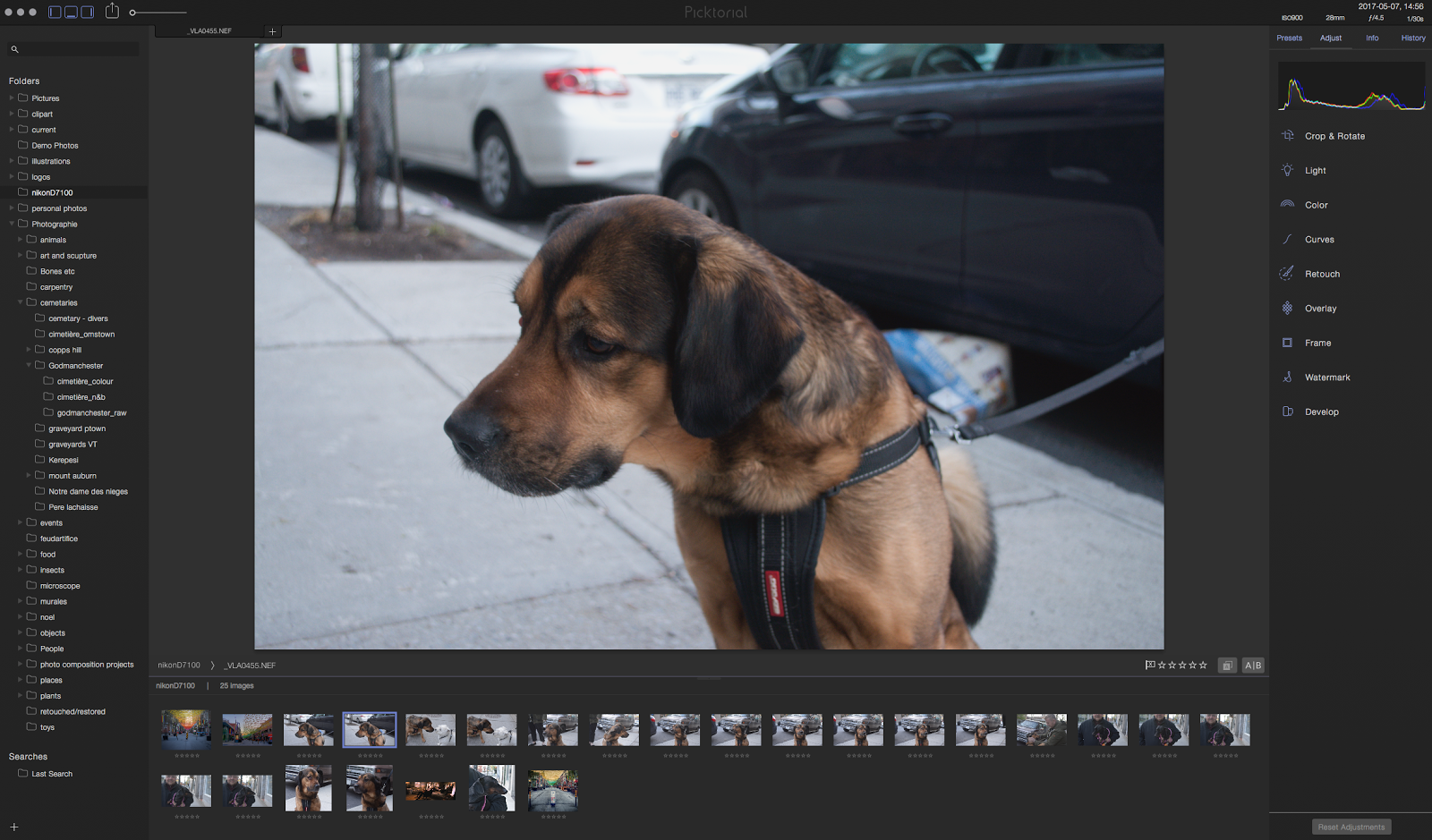
In my quest to rid myself of Adobe products I have discovered something I hope to replace Adobe Bridge with. I mostly use Bridge to look through my images (photos illustrations files etc) and not to edit them but this new software offers a nice range of editing tools so I might just try them out. 

The app is called Pictorial and I immediately liked the interface and speed the images loaded. I did notice a couple hick-ups for my workflow, however. 

Since I use Affinity Designer and Photo over Photoshop and Illustrator now, I noticed those files simply were not visible in the Pictorial window. A huge disappointment. Affinity is working on it's own DAM software, but when that will get released is anyone's guess, could be as far as a year off or more. I contacted Pictorial to ask if at least seeing the preview images was in the roadmap and it wasn't... until I asked. Within a day they sent me a test version with the ability to see small .aphoto previews in the viewer! That is service! They also explained clearly what the problems were in getting larger images and that seeing eps, illustrator and other files in the viewer would be possible but isn't immediately available and why that was. 

So while this isn't the perfect replacement for me, it's the one I am using exclusively on my laptop and more and more on my desktop. I don't think it will be long before it does everything I need. 

21 March 2017

New(ish) Macbook Pro (2015)


My old MacBook Pro had been showing serious signs of decay over the last few years, not a surprise since it was over 6 years old and well used. It took 5 - 10 minutes just to fully turn on. I was becoming unusable for my work so I started looking into new laptops to replace it. Luckily, my brother had bought a MacBook Pro less than a tear before and wanted to sell it so while it’s used, it’s practically new - to me anyway. 

This past weekend I transferred my old files and programs to the new computer. I used Apples Migration software and it was going pretty poorly. I was using wifi for the transfer and it just wouldn’t work. To top it off, the new machine did not have an ethernet port, the way I usually transfer from one computer to another. In the end I had to buy a Thunderbolt to Thunderbolt cord and the transfer flew by with no more issues. The next day, I tried to wipe and re-install the OS on my former machine so I could sell it - dead… it couldn’t do anything. I guess I waited until the very last moment to make my upgrade. 

How is the new MacBook Pro?
This is the pro before the new miniscreen on the keyboard that takes place of the F keys and gives more functionality to certain programs. I was interested in having that but the price to get a new  MacBook with it was too high. There were other reasons to reject that newer model, however. The new models have one port… one! This MacBook has USB, A flash card port for my camera, 2 thunderbolt ports, hdmi port… all of which are useful to me and I really did not want a portable that needed 100 widgets to connect things. 

There is a vast improvement to the screen, I can now do colour corrections and work on my photos with less worry it won’t look the way I want on my bigger home system. The updated graphics card and 16 gigs of RAM really make it a real alternative for my 3D work and should help me with rendering complicated projects. The i7 processor and flash drive boot it up in seconds and all my software just flies on it. No more beachball of death as I try and save a photo or Indesign file.  It is also thinner and lighter, features that don’t really impress me much but are nice to have  just not essential from my point of view. 

Conclusion

This was a great purchase for me. It’s fast, practical and should service my needs for at least another 5 years. It will have to, my lack of actual paid contracts and home renovations this year with cripple my finances for years to come. At least now I can continue to work no matter where I am. 

As an aside, I also stripped the application folder to the bare minimum of software, which means only the Adobe program I can't replace with something else. (Namely Indesign and After Effects). This, I think should save me from running low on RAM as much and frankly, the Affinity products I am using are much faster and practical on the laptop. 

08 December 2016

Affinity Photo 1.5

As promised, Affinity has released a HUGE update to their photo app and it's pretty amazing over all.  Already giving Photoshop a run for it's money, this version fills in many gaps and requests from users and really puts it level with and in some cases above Photoshop now in terms of usability and useful features.

Is it perfect? No at all. What it is is a robust, professional photo editing app that has most of what any pro might need. I really like the new stacking features and the focus stacking outshines Photoshop in my opinion  easily. Where it needs work is the HDR persona. I am an avid user of the NIK?Google suite of plugins, especially HDR Pro and that is still king for my work in HDR. It's hard to even get similar looks for comparing the two with the same images. One feature all the NIK/Google plugins have is the pin selection tool which is put genius for selecting areas to affect changes to. I don't know why no one else has taken this approach because I would use it for just about everything. The pugs for the most work well in Affinity Photo, the improvement being part of this update so I was hoping i could import an HDR and then tone it using HDR Pro... didn't really work well. It looked fine in HDR Pro but didn't import back into Affinity photo. Maybe this is something that will be addressed in  the next update (which come fairly often).

Right now the price is lower so I would say buy it if you don't have it already. Updates are free until they get to version 2.0 I think and with Adobe's monthly rip off scam and price, getting this now is a no brainer.

A 4 image focus merge taken with natural light:


HDR with Affinity Photo:


Similar shot, taken minutes apart with HDR Pro.
I really couldn't get them much closer. I had better luck using HDR pro in Affinity Photo with just one RAW file.


27 September 2016

Sparkle web design app


In my quest to replace Adobe products with more affordable and better made applications that don’t charge me for the privilege of using them them every month, I may have finally come across  Dreamweaver alternative that works for me. 

To be clear, this is not a program for coders… in any way shape or form. It’s clearly for people like me who are designers and want something that works closer to a page layout program. While it is not as flexible as many might like, it basically covers all the bases and will improve with each iteration in response to what the users say they need. 

I am currently re-working the Behemoth media site with it and almost immediately came across a bug. I contacted Sparkle, got a reply in a couple hours and a solution minutes after I sent in the file for them to look at with promise to look into the bug right away and a quick tip baed on the file I sent that was more than a little helpful. So it is fair to say they won me over fairly quickly over the poor service I’ve reviewed at Adobe over the last many years. 


Using the application is very simple to figure out and not having to work in tables and place everything where you want, even over other elements without having to think of the technical aspects is very freeing as a designer. I haven’t found any templates available, which to me at least is a good thing. nor have I found any plugins, though you can embed code using a an embed object that might allow to insert Hype animations at a future date. The gallery feature is basically and easy to use, very clean looking with limited but useful adjustable parameters. This could be said about almost all the features offered at present.. clean, useful, uncomplicated. 


I am just starting with this software but I already love using it. I swear a lot less and work much faster. I don’t do much web design for clients these days, that business all went to the drag and drop companies a couple years back, so something like Sparkle handles all my current needs very well and I assume it will only get better from here on out. 

Update: behemoth media site updated with Sparkle


09 May 2016

De-VFlicker plugin from seed.


MOntreal_laspe_fliker test from Vincent-louis Apruzzese on Vimeo.

First 8 seconds are untreated, then the video after the effect was applied. It's quite a difference.

This new plugin from Seed came to my attention from FCP.co today and after asking if it worked with time-lapse video and getting a positive response.. I bought it immediately. De-flicker plugins cost 100s of dollars as a rule, for too much for me to buy just in case I need it. This is only 29$ USA for Final Cut X so it's well worth it.

05 March 2016

Plugin Odds and ends

Echo remover


This was on sale as a new plugin from Crumplepop and as I had decided 500$ was too much for the only other noise remover for Final Cut X, 50$ seemed very reasonable. It has only  couple sliders but I found it to be effective and did what it said it does. I am sure the more expensive plugin had tons of features but as I am not a sound pro, this was really perfect for making the sound on the Million Year Picnic doc a little nicer. 

Turbulence FD (with X Particles)


I have just stared to use this plugin, which produces realistic smoke and fire effects in Cinema 4D, but it has already been useful in the Look Kool, the Tv sow I do effects and animation for. 

It was far too money for my tastes, but C4D has no way to do smoke,water or fire (unlike pretty much every other 3D program now, including free ones) but it produces great results, quickly. To really get the most out of it, you need to couple it with X particles, bing the total price to almost 1000$ CAD! I already had X Particles so I took the plunge and am hoping to get more effects work as a result. Everyone loves explosions. Besides the high price, another negative is Jawset provides links to tutorials, but doesn’t provide any themselves and many of the tuts listed cost more money. They look great but for the fee Jawset charges, there needs to be at least some basic training included. 

Reelsmart Motion Blur


This is a pretty amazing plugin. It does one thing, which is to put a motion blur on things in After Effects, Motion etc (each program added costs more). Again, not cheap but C4D motion blur can look great but at a HUGE time cost in rendering and this basically adds a almost nothing in terms of render time and has a lot more control. For the TV show this means a clip that would have taken 2 hours to render out can be reduced to 45 minutes and I can play with the amount using keyframes and test blurs without having to re-render in C4D. Plus the site has quite a few video tutorials to take you from knowing nothing to very competent in a  short period of time. 

16 November 2015

Antidote 9 review


Druid software has released a new version of Antidote, their already great text correction software with the one feature I thought it was lacking. Since I write in French and English over the course of any given day, I have been using Antidote for most of my correction needs. It not only fixes misspellings but tense disagreements and gives you synonyms, examples of usage and a million other things in French.  The new version does all that but now has added and English module that does all for English now too! Plus it does both languages in the same email/document so if I need to write sing both languages, they can both get corrections.

This is not a translation program, it is a writing aid, helping you t not just fix mistakes but help in the writing process. It also doesn't auto-correct which I think we can all agree is worse than Hitler. I am fairly dyslexic so I don't see the substituted words as the wrong once often and then I have to explain and re-write and re-send the message filled with statements more nonsensical than my dyslexia could ever come up with. This opens a sport window and lets you decide not only if the correction actually is one but explains why it chose to flag what you wrote.

So I had been waiting for an English version of Antidote for years and finally, it's not only here but rolled into the software I use all time !The only issue is it won't update my Safari browser plugging my iMac right now and the best thing aside from the English addition is I was finally able to install it also on my laptop despite the version on it was not the same serial number as the iMac version. For a while I had to buy a separate licence to get it on both which is expensive and annoying but that is thankfully in the past.

27 August 2015

BenQ monitor


Less than a week ago my Apple 24 inch Cinema display lost it’s picture, just the picture. The USB ports, sound and camera still worked fine but those things without a image don’t make a good monitor! As this was my secondary monitor I didn’t feel the need to get the 1200$ new version which, while really nice is way out of my price range.

Luckily there are a ton of lower end, well priced alternatives. After looking around I found the BenQ, with decent reviews and well under 300$. 

Pros:
Cheap. 27 inches. lightweight. LED display.

Cons:
Weird interface to set it up. Didn’t recognize the HDMI port automatically. Image is acceptable but compared to even the old 6 year old 24 inch Apple display, it’s noticeably of poorer quality. No camera, ports. Text does not look great on it.

Conclusion:

For a second monitor its fine and well priced. Image is good enough for most things but not really for colour work on photos or video.